Exhale and pull elbows in for steady shots: Especially if you're not rocking a vibration-control lens on a DSLR rig, this body-steadying practice can make all the difference for no-flash shots.
Use the Unsharp Mask/Smart Sharpen for crisper shots: Photojojo explains how to use Photoshop (and similar photo editing tools) to get finer contrast on digital camera pics. Our commenters wisely point out, however, that the Smart Sharpen tool in Photoshop CS1 and later is the way to go.
Deal with shooting in direct light: Because you, and your subjects, can't always get up at the hour just after dawn, Digital Photography School explains how to work with, and around, a hard sun.
Get behind something to shoot more candidly: As Rick pointed out (taken fromDigital Photography School's tips), it's hard to walk around with a lens pointed and not be noticed. For more candid shots, try shooting over someone's shoulder, or shooting through or around something that you don't mind being in the actual photograph for a voyeuristic effect—tree branches, window frames, and the like.
Get a cheap, DIY lens hood or flash filter: A lens hood—like the kind you can print yourself—prevents glare, flare, and other light tricks beaming in from just around your lens edges. Similarly, a piece of white coffee filter can work wonders for diffusing your flash, giving bar shots and other low-light situations a much mellower light.
If you had only one tip to give a newcomer to digital photography, what would it be? Step up the chalkboard in the comments.
Monday, February 22, 2010

Photographs At Sunrise - Dawn Photography Tips & Tricks
Location, Location, Location
Look for places with spectacular east-facing vistas, from hilltops to lakesides. Where can you best take advantage of the fabulous display of colors that dawn offers? Think places that display as much as the sky as possible, and places where the light will reflect.
Don't forget, the sunrise is more than just a pretty skyscape. Dawn also provides beautiful ambient lighting in shades of gold and rose, and is often accompanied by diffusing mist. Think of things you might want placed in such lighting conditions, forest silhouettes, a lovely model, skyscrapers fading away upwards into the sky. Be creative with the lighting that dawn affords you! Otherwise photographically unstriking objects can be transformed by the sunrise, and there may be things happening at this early hour of the morning that you were previously unaware of. Take a walk downtown and take a shot at early commuters sipping their coffee with the sunrise, or by the lakeside and see the birds.
Another consideration: distance from wherever you'll be lodged. The closer, the better, as that means less driving you'll have to do. You may be an excellent driver, but that doesn't mean that rolling out of bed and into a car is necessarily the best thing to do in the dark before dawn—between poor lighting conditions and grogginess, accidents can happen.
Dawn Skyscape Examples
Technical Considerations
Dawn involves some complex lighting situations, which make certain demands on your technical skills as a photographer. Particularly early dawn, before the sun has come up, the low level conditions may require longer exposures, for which a tripod or other stabilizing device comes in particular handy.
Manual exposure is really a must, as getting exactly the right metering can be difficult in these conditions. Even so, with the sun right on the horizon, it may be impossible to get both the sky and the land both exposed correctly. There's a few things you can do here. Use of a graduated ND lens filter may help, or you could try HDR techniques by taking multiple exposures of a single image and putting them together later. Extensive editing of the image afterwards may also allow you to create an image where everything appears to be correctly exposed.
There's no single good approach to aperture, ISO and focus for dawn photography: it entirely depends on the particular shot. ISO and aperture may be adjusted for available light accordingly, though you might want to keep a large depth of field if you're taking landscapes. Focus, chances are you'll want it out to infinity for those skyscapes, but again, there are other things to shoot than the sky!
Taken At Dawn: Misty Scenes
Important Gear
As previously mentioned, sunrise means low light, which means a tripod is especially handy, and high contrast, for which a graduated ND filter might be useful. If you have one, a wide angle lens might help you take advantage of an expansive skyscape that will open up before you at dawn. Otherwise, with a little stitch-assist, you can still take panoramic views of the dawn.
Don't forget about taking care of yourself, either. You know the phrase, “it's darkest before dawn?” Well, it's also the coldest, and having shaking, numb hands will not lead to good photography. Make sure to wear warm gloves that still allow your fingers to nimbly access your camera's buttons and dials. If you're in a place that tends to frost and dew heavily, wear stiff, closed-toe shoes with good traction.
Before You Leave
There are a few other things to consider as well. Check the weather forecast the night before: there's no point in getting up that early if all you'll see is the same gray drizzle you'll see all day. If you're going further afield for your shot, make sure you know the route to your area so you aren't puzzling it out while also racing the sunrise. Check sunrise times for the area in question, and make sure to be there at least fifteen minutes before the actual sunrise, and plan to be there at least a half hour afterwards: the shifting play of lights makes for a constantly evolving show for you to photograph. Preparing coffee and at least a light snack is also a good idea: a cranky photographer is not a good photographer! So that the morning goes smoothly, try to lay out your photography equipment and everything else in advance the night before.
So, all that being said, set an alarm, and good luck
Look for places with spectacular east-facing vistas, from hilltops to lakesides. Where can you best take advantage of the fabulous display of colors that dawn offers? Think places that display as much as the sky as possible, and places where the light will reflect.
Don't forget, the sunrise is more than just a pretty skyscape. Dawn also provides beautiful ambient lighting in shades of gold and rose, and is often accompanied by diffusing mist. Think of things you might want placed in such lighting conditions, forest silhouettes, a lovely model, skyscrapers fading away upwards into the sky. Be creative with the lighting that dawn affords you! Otherwise photographically unstriking objects can be transformed by the sunrise, and there may be things happening at this early hour of the morning that you were previously unaware of. Take a walk downtown and take a shot at early commuters sipping their coffee with the sunrise, or by the lakeside and see the birds.
Another consideration: distance from wherever you'll be lodged. The closer, the better, as that means less driving you'll have to do. You may be an excellent driver, but that doesn't mean that rolling out of bed and into a car is necessarily the best thing to do in the dark before dawn—between poor lighting conditions and grogginess, accidents can happen.
Dawn Skyscape Examples
Technical Considerations
Dawn involves some complex lighting situations, which make certain demands on your technical skills as a photographer. Particularly early dawn, before the sun has come up, the low level conditions may require longer exposures, for which a tripod or other stabilizing device comes in particular handy.
Manual exposure is really a must, as getting exactly the right metering can be difficult in these conditions. Even so, with the sun right on the horizon, it may be impossible to get both the sky and the land both exposed correctly. There's a few things you can do here. Use of a graduated ND lens filter may help, or you could try HDR techniques by taking multiple exposures of a single image and putting them together later. Extensive editing of the image afterwards may also allow you to create an image where everything appears to be correctly exposed.
There's no single good approach to aperture, ISO and focus for dawn photography: it entirely depends on the particular shot. ISO and aperture may be adjusted for available light accordingly, though you might want to keep a large depth of field if you're taking landscapes. Focus, chances are you'll want it out to infinity for those skyscapes, but again, there are other things to shoot than the sky!
Taken At Dawn: Misty Scenes
Important Gear
As previously mentioned, sunrise means low light, which means a tripod is especially handy, and high contrast, for which a graduated ND filter might be useful. If you have one, a wide angle lens might help you take advantage of an expansive skyscape that will open up before you at dawn. Otherwise, with a little stitch-assist, you can still take panoramic views of the dawn.
Don't forget about taking care of yourself, either. You know the phrase, “it's darkest before dawn?” Well, it's also the coldest, and having shaking, numb hands will not lead to good photography. Make sure to wear warm gloves that still allow your fingers to nimbly access your camera's buttons and dials. If you're in a place that tends to frost and dew heavily, wear stiff, closed-toe shoes with good traction.
Before You Leave
There are a few other things to consider as well. Check the weather forecast the night before: there's no point in getting up that early if all you'll see is the same gray drizzle you'll see all day. If you're going further afield for your shot, make sure you know the route to your area so you aren't puzzling it out while also racing the sunrise. Check sunrise times for the area in question, and make sure to be there at least fifteen minutes before the actual sunrise, and plan to be there at least a half hour afterwards: the shifting play of lights makes for a constantly evolving show for you to photograph. Preparing coffee and at least a light snack is also a good idea: a cranky photographer is not a good photographer! So that the morning goes smoothly, try to lay out your photography equipment and everything else in advance the night before.
So, all that being said, set an alarm, and good luck
Tips and Tricks for Spring Photography
Flowers in Bloom
Flowers are one of the most popular photography subjects in the spring. They provide photographers with beautiful colors and shapes to capture and the photos can make wonderful artwork in your home. Make sure you keep your flower photography interesting with these simple tips and tricks:
Utilize natural light and don't use a flash. Typically, flowers are photographed in full sunlight. Try taking pictures at dawn or at dusk to get a new perspective on your flowers.
Master your depth of field. To create a shallow depth of field, use a large aperture on your camera.
Shoot your subjects close-up. Combined with a large aperture, this will blur out your background, leaving only your flowers in focus.
Look for flowers that haven't bloomed yet. Make your photos stand out by capturing the steps leading up to a fully-bloomed flower. Find seedlings just popping out of the ground or closed buds. These objects can be just as beautiful as a colorful bloom. Plus, these photos are more representative of what spring is all about: new life and growth.
To learn more about photographing flowers, check out the article series called Flower Photography Tips, Tricks & Mistakes.
Rain and Reflections
With the wet weather that accompanies the spring, photographers have plenty of opportunities to capture photos of falling rain and dewy flowers. If you do plan to shoot in the rain, make sure you have a hood for your camera to protect it from getting wet. Keep plastic bags and towels handy for keeping things dry, including your hands for when you are touching the camera. When you go to shoot, leave your shutter open for a little longer to capture the rain falling; this will result in long streak so of rain fall that look like strands of silver falling from the sky. Take pictures of the rain hitting a river, stream or lake for a uniquely textured effect.
Another opportunity for photographers takes place right after a rainfall. Take pictures of the rain-soaked environment afterwards for a springtime look. Make sure you capture the unique, pale light that follows the rain in a landscape photo. You can also go for close-ups after the rain. Puddles and other bodies of water provide excellent opportunities tocapture reflections. Challenge yourself to create a ripple-effect photo by blowing on or touching the water in the puddle right before you take the picture.
Springtime Portraits
When it comes to photographing people in the spring, get outside in the cool weather for a few portrait shots. This weather often makes for nice portraits because the light is a crisp, blueish hue during the spring. Because the light is a cooler color, considering having your portrait subjects dress in similar colors to match - pastels are good for children, while whites, blues, greens and purples are better for adults.
The best time to take photos of people in the spring is once some of your natural surroundings have started to bloom again. You don't need to wait until the leaves are fully-grown on the trees - in fact, trees look beautiful in their temporary state when they are dotted in tiny green buds. If you wait until things begin to bloom, it will add a pop of color to your photo and it will demonstrate to other people who may see the photo that it was taken in t
Change the Tone of Your Photo to Cool Temperature
Subject Matter
The easiest and surest way to create a photograph filled with cool tones? Your subject matter. Look for icy winter days, or a model with cool blue eyes and a pale complexion. While sometimes you just don't have a whole lot of choice at this stage, taking deliberately cool subjects will cut down on any post processing work you plan on doing later.
Subject & Lighting Examples
Lighting Conditions
The next best way to give your photograph an overall cool cast? Use of cool lighting. While again, you don't always have a whole lot of choice on the matter, especially if you're working outside, there are some things you can do. Predawn lighting tends to be a beautiful shade of blue if you can get up that early, as well as late twilight. LED lighting if you're working indoors also tends to be quite cool.
Camera Lens Filters
If all else fails, you can still change the tone of your photograph through physical means through the use of color filters attached to your lens. These tend to be expensive, as well as nonadjustable, so they aren't a good solution for everyone. However, you can make your own DIY color filters for relatively cheap, so this is certainly still a possibility for those with less well endowed wallets.
Use of White
Using a lot of white in a photograph tends to give it a more cool feel. While this should be used in conjunction with other cool tones, the neutrality of white coupled with at the very least a lack of obviously warm tones can really add a subtle cool feel to the photograph.
Temperature Contrast
A great way to make a photo feel more cool is by slipping a little warmth into it for contrast. It's easy to overwhelm the subtlety of cool tones by adding too much warmth to a photo, so be careful in your composition. Bright flowers for instance, even if there aren't too many of them, tend to steal the tonal focus away from the cool colors.
Contrast & Filter Examples
On-Camera Digital Filters
Your camera comes pre-equipped with many powerful means of altering your photos, including a number of preset color filters. Many filters also let you create custom color balances on-camera, providing you with even more flexibility. Experiment with your camera to understand the nuances of its preset filters, and how they affect the coolness of your photos.
Lighting Condition Filters
Of course, your camera also comes equipped with some filters for certain lighting conditions. But who says you have to use them for the lighting conditions they're intended for? Indoor lighting tends to be very cool compared to outdoor lighting settings, and sunny day settings relative to cloudy day settings. Play around with using settings one step cooler than the environment technically requires and see where it takes you.
Preset Color Filters
Digital image editing programs allow for a number of very basic color filters that you may apply to your photos. Depending on your program of choice, some offer a number of presets for particular white balances, including for cool tones. This is a quick and easy way to add coolness to your photos, though not a particularly nuanced one.
Levels & Color Balance
Want the most manual control you can get in color temperature? Play around with adjusting color balance directly, or levels. While this takes some practice to get the hang of achieving the effect you want, the sheer level of control you have is deeply gratifying and allows you to accomplish many more effects than you could otherwise.
For the flip side, check out an article on adding warmth to photos, and another on general color filter and color temperature.
The easiest and surest way to create a photograph filled with cool tones? Your subject matter. Look for icy winter days, or a model with cool blue eyes and a pale complexion. While sometimes you just don't have a whole lot of choice at this stage, taking deliberately cool subjects will cut down on any post processing work you plan on doing later.
Subject & Lighting Examples
Lighting Conditions
The next best way to give your photograph an overall cool cast? Use of cool lighting. While again, you don't always have a whole lot of choice on the matter, especially if you're working outside, there are some things you can do. Predawn lighting tends to be a beautiful shade of blue if you can get up that early, as well as late twilight. LED lighting if you're working indoors also tends to be quite cool.
Camera Lens Filters
If all else fails, you can still change the tone of your photograph through physical means through the use of color filters attached to your lens. These tend to be expensive, as well as nonadjustable, so they aren't a good solution for everyone. However, you can make your own DIY color filters for relatively cheap, so this is certainly still a possibility for those with less well endowed wallets.
Use of White
Using a lot of white in a photograph tends to give it a more cool feel. While this should be used in conjunction with other cool tones, the neutrality of white coupled with at the very least a lack of obviously warm tones can really add a subtle cool feel to the photograph.
Temperature Contrast
A great way to make a photo feel more cool is by slipping a little warmth into it for contrast. It's easy to overwhelm the subtlety of cool tones by adding too much warmth to a photo, so be careful in your composition. Bright flowers for instance, even if there aren't too many of them, tend to steal the tonal focus away from the cool colors.
Contrast & Filter Examples
On-Camera Digital Filters
Your camera comes pre-equipped with many powerful means of altering your photos, including a number of preset color filters. Many filters also let you create custom color balances on-camera, providing you with even more flexibility. Experiment with your camera to understand the nuances of its preset filters, and how they affect the coolness of your photos.
Lighting Condition Filters
Of course, your camera also comes equipped with some filters for certain lighting conditions. But who says you have to use them for the lighting conditions they're intended for? Indoor lighting tends to be very cool compared to outdoor lighting settings, and sunny day settings relative to cloudy day settings. Play around with using settings one step cooler than the environment technically requires and see where it takes you.
Preset Color Filters
Digital image editing programs allow for a number of very basic color filters that you may apply to your photos. Depending on your program of choice, some offer a number of presets for particular white balances, including for cool tones. This is a quick and easy way to add coolness to your photos, though not a particularly nuanced one.
Levels & Color Balance
Want the most manual control you can get in color temperature? Play around with adjusting color balance directly, or levels. While this takes some practice to get the hang of achieving the effect you want, the sheer level of control you have is deeply gratifying and allows you to accomplish many more effects than you could otherwise.
For the flip side, check out an article on adding warmth to photos, and another on general color filter and color temperature.
Thursday, February 18, 2010
Macro Photography – A Brief Discussion

Macro photography is one of the most attractive and popular forms of photography. According to some experts it is very easy to master the art and techniques of macro photography – and that is, perhaps, the secret behind its fame.
Definition of Macro Photography:
Strength of the lens or the range of the lens determines whether the style can be called macro photography or not. A camera with a lens that has a 1:1 range should be used in macro photography so that the image size on the negative or slide is equal to the actual size of the subject.
Hence, if you are using 35 mm photographic film, you should use a camera that can focus on 24x36 mm small area. Then only you can take picture of a subject where the image size on photographic film is equal to the real size of the subject.
What’s interesting in Macro Photography:
Macro photography opens up the doors of a new world. It captures minute details of the subjects – such details are not at all visible in the naked eye. Hence, the viewer can reveal a lot of new things in most familiar subjects while watching the photographs. And unfamiliar subjects become more attractive in macro photography. According to photo critics – macro photography is not only attractive, but seductive!
For example, when someone takes a picture of a rusted chain in 1:1 range, you get to see the exact texture of rust. How rusts look like, what is the exact color of rust and many other minute factors come into notice. That’s what makes macro photography attractive.
Ideas & Subjects of Macro Photography:
People with a knack for photography find the subjects their own. They are artists and they have the eye for the right thing. However, those who are new in this field and about to start their career might need help finding the subject.
Snowflakes, water drops, minerals, butterflies, plants, leaves, flowers and flower petals, baby feet and fingers, eyes, spiders and spider web, insects etc. are the common subjects. Get out in your backyard garden and you will find plenty of subjects worth taking a picture. Macro photography ideas are available online to help you develop the ability to find the right subject.
Nature has always been the main subject of photography and art. However, macro photography experts often take photographs of items such as stamps, coins, automobile parts, wrist watch, pen parts, and other small things and collectibles.
Macro Photography Tutorials:
Working in this field is a new experience even for those who have been involved with photography for long. Opportunities are unlimited here – new equipments and techniques are invented everyday. With the advent of digital photography, entire world has been revolutionized.
Digital photography tutorials for macro photography help photographers make full use of digital cameras and other equipments in the process. However, it is not mandatory to use digital cameras. Traditional film based cameras are still popular and will be in the market for next few decades if not centuries.
Experts prefer SLR digital cameras for macro shooting. However, compact point and shoot cameras can yield good result too. To know more about photography, take some lessons or tutorials online. Know about photography techniques and equipments; become an expert photographer.
Take Great Photo Every Time !!!

Learning to take amazing action shots is a skill that can be learned through practice and continued study. Keeping up with fast-paced actions and movements is certainly a challenge, especially among beginners. From soccer matches, fast moving cars to animals in motion and other moving objects, capturing fast action on a digital camera may be difficult, but it can be done. This digital photography guide gives you some tips on how this can be achieved.
Get to know your camera. Get acquainted with its shutter lag features. Usually, digital cameras with less shutter lags take better action shots. The trick is to minimize the shutter lag by pre-focusing before you snap a picture. Try holding down the shutter button halfway. Once your subject is in focus, press it down all the way to capture their every movement.
Another trick you can use is fast shutter speed. Taking pictures of moving objects requires a camera that is capable of performing at fast shutter speeds. This way, you will not miss a wonderful action shot. Practice shooting on this mode, but remember to try panning your camera and keep your lens on your subject. If continuous shooting mode is available, then you are good to go. Digital cameras with continuous shooting features work efficiently when capturing action shots. It enables you to put every second of your subject's movement in every frame, giving you a selection from which you can choose the best shot.
If you want to successfully take action pictures, location is crucial. Position yourself well so you can get the full view of the heat and sweat of the action. For instance, when shooting athletes in action, park yourself at the finish line to get that winning shot. If perfect location is somewhat difficult to achieve, then invest in a good lens. This digital photography guide recommends using a 200 mm lens, though you can also use other lenses to achieve different effects. For instance, a zoom lens will help take sharp photos of athletes, clear enough to see the sweat on their brows or the pimple on their cheek.
Lastly, have enough memory capacity. Bring along backups to prevent limiting yourself to a set number of shots. For an aspiring photographer, it is important to be prepared. Excellent photo opportunities tend to come along unannounced, especially when trying to capture action shots.
Turning from a novice photographer into a professional is not easy. People say that it takes years to learn to become a great photographer. However, with valuable discussions and learning modules based on actual photography experiences, moving from an average to a stunning photographer can take as little as fourteen days.
Contrary to common wisdom, you do not need a great digital camera to take great pictures. All you need is an effective and supportive teacher that offers photography opinions based on experience, not theory. Practical tips like these are more effective in helping you to develop valuable action photo skills. I hope this short digital photography guide has helped, and that you can utilise some of the tips when setting out on your own action shots. Supplement this with an online photography course, and you could be recording successful action shots within a couple of weeks.
Wedding Photography tricks !

A wedding day is a huge event - possibly the most important day of a person's life. While the event may last for one day, the memories linger forever. Hopefully, with the aid of some really well taken photographs. However, in current times, things can be tough. Professional photographers may be used only in limited scope at the ceremony, and you could be asked to contribute your photographic skills to the event. Fortunately, if you can take a decent picture, you can also capture successful wedding photographs for a friend or family member. Here are a few digital photography tricks to help you do just this.
Lighting is one of the most important aspects of successful photography. Harsh lighting can create photos that aren't pleasing to the eye. Shadowing can be just as bad to the final image. Natural light is best, so if possible capture the couple in the great outdoors. Early morning or dusk usually provides the most pleasing lighting opportunities. If you are taking your shots in full daylight, look for a shady spot to diffuse the harsh effect of noonday sun. However, avoid mixed sun and shade at all costs. A digital camera has trouble deciding which lighting spectrum to use to focus and the shadowing is less than flattering to the couple.
If you are taking the wedding photographs inside, some types of artificial lighting are definitely better than others. Fluorescent lighting is the least desirable for a portrait. It is very hard to capture natural looking results under these types of light. Regular incandescent light bulbs are better, but not nearly as good as natural light. If possible, set up your shot near to a large window, diffusing the light for a more natural effect.
One of the biggest digital photography tricks that amateur photographers forget is to pay attention to details. Especially with wedding photography, where you are trying to create a mood, you want to get in close - really close! Take close ups of the bouquet, the rings and the cake cutting. Let the bride and groom's first dance fill the frame. Don't let the "I do!" moment be distracted by the ring bearer making a funny face in the background. Focus on the details by getting up close and personal.
You should also pay attention to composition. Professionals follow a fairly simple principle known as the rule of thirds. Mentally divide your frame into thirds across and down so you have nine even boxes. You should compose your image along those guidelines. You could have two-thirds of the frame feature the couple, and one-third background, or vice versa. The eye needs a place to rest, and the image should have a natural point of focus to draw the attention of the viewer. This will probably take some effort, at first, but you'll find yourself doing this by instinct after awhile. You can also train your eye to recognise good composition by using a class or online course.
As you can see, you don't really need a fancy camera in order to take successful wedding photographs. By following a few simple digital photography tricks, you'll have much better results. You'll also find that, over time, you will gain more experience and taking great pictures will come much more naturally to you.
Your Digital SLR's Secrets!

Few would argue that more people than ever can take pictures of real quality, as digital photography and the equipment available opens up opportunities for the keen amateur. Modern digital SLR cameras are boasting more and more megapixels and features, which can almost make photography seem too easy. However, there is functionality and easy to grasp techniques that many budding photographers never take advantage of. This article aims to address a few of the digital photography tricks and tools available.
Camera shake is the surest way to ruin a photograph, and can still occur even with your camera secured to a tripod. For example, you still have to press the shutter, and this causes some movement. This will ultimately affect the sharpness of your final image. There are two ways this can be avoided. The first is to use a remote control shutter release button, or the less expensive cable release alternative - both will do the job well. Otherwise, you can set your camera's self timer option. All that is required is that you set up the shot and settings, then stand back while the camera carries out the shutter press for you.
No matter how much care has been taken during the original shoot, most modern day photographers will carry out subsequent image manipulation. To give you the opportunity of making the most of this facility, it is always a good idea to shoot your original image in RAW rather than JPEG format. JPEG images contain 256 brightness levels in each of the three colour channels (red, green and blue). However, RAW files contain up to 16,384 levels, which means you can have much more influence when amending your image, for instance making significant changes to highlights or shadows.
One of the digital photography tricks to consider is using your SLR's Live View mode. Here you can set up your photo on the LCD monitor, rather than the viewfinder. One advantage to using this is the number of viewpoints you can use, for example, holding the camera above a crowd of people, and still being able to get an idea of what the final image will look like. Many people believe that it is easier to see the final composition by using Live View as opposed to the viewfinder.
Once upon a time, ISO was determined by the film you used. That is to say that you would be forced to stay with, for example, ISO 200 for all 36 shots if that was the film in the camera. However, with digital photography, you can adjust ISO for every picture you take, if necessary. Generally, an ISO setting of 640 or above can start to show some noise in your image. You need to consider the trade off between upping the ISO to allow shots in dark conditions, and accepting some noise, or missing the image altogether. In most cases, the auto ISO setting would work sufficiently.
These are just a few of the digital photography tricks that you can use, to help unravel the mysteries of your SLR.
Simple Techniques For The Perfect Panning Shot!

Every time you open a motor sports magazine, you will see them - the panning shots. Through his skill and expertise the photographer has frozen a speeding vehicle, whilst successfully blurring the background to capture the sense of motion. This area of photography may well be an exciting genre, but if you thought it required years of training to master, you would be mistaken. With just a few digital photography tricks, you can soon take panning shots that family and friends would be proud of.
So when are panning shots used? Well, sports mainly - such as running and cycling, as well as motor sports. But similar techniques can help make your wildlife and nature shots look out of this world. Birds are excellent subjects. Geese or swans, being somewhat slow and lumbering, make surprisingly easy targets when panning. A panning shot helps the viewer to appreciate the element of motion, and is therefore far more powerful than a static shot taken using a super fast shutter speed.
The subject of the shot needs to be moving left to right, or vice versa. A colourful and blurred background helps to lend to the feeling of motion, but the aim is to make sure that your point of interest appears beautifully in focus. Whilst this is true for most sports pictures, in nature a plain background can be used, for example when photographing a humming bird and trying to capture the movement of the wings. A digital photography trick to remember is to take a decent zoom lens along for your shoot.
Panning is the act of tracking the subject with the camera, whilst taking a single, or multiple shots. Trial and error is the best approach. 15 successful shots from one hundred attempts does not sound like much, but you are doing well if you achieve this. The advantage of this digital age is that you can "bin" anything you don't need - at the end of the day, if you get one truly memorable image, the viewer won't know, or even care, how many goes it took you to get it.
There are multiple settings you could select, but a good one to try is Continuous Focus, or Servo. In this setting, the camera constantly focuses on the object as you pan. Combine this with the Continuous Shooting mode and you will be able to capture multiple shots.
Some of the best panning shots I have taken are where I have placed the subject slightly off centre, allowing space for them to drive, or fly, into. Understandably, concerns with composition are not always at the forefront of your mind when attempting to capture a speeding object, but a few digital photography tricks can be applied subsequently in Photoshop, if required, to address this.
Wednesday, February 17, 2010
Digital Night Photography

Digital night photography can produce some stunning shots full of illumination.
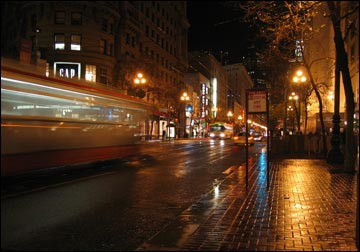
This type of photography requires long exposures to get enough light onto the sensor, so a tripod is a must. You can be really creative with night shots and some of my favourites include fireworks and cityscapes.
I hope you have found these digital photography techniques and tips to be useful and interesting. If you want to keep up-to-date with this website as it grows, then why not subscribe to my Digital Photography Blog or sign up for my newsletter.
By the way, my friend and business partner, Amy Renfrey, has a great and easy to follow ebook called Digital Photography Success. If your photos are less than satisfying, then let Amy show you the digital photography techniques required to make your pictures superb and outstanding with sharp clarity and perfect definition.
Amy is offering a special deal on her photography courses at this moment in time so make sure get yours before it’s too late.
Digital Wedding Photography

The key to successful wedding photography is preparation and planning. You’ll need to visit the venues, before-hand and also talk to the bride and groom about what shots you’ll need to keep everyone happy.
An essential piece of kit for the wedding is a flash. There will be a lot of indoor photos and a tripod would also be useful.
Digital Landscape Photography

A well composed landscape shot should have a beginning, a middle and end, just like a good story.
The quality of light can have a profound effect on the appeal of a landscape photograph, so make it your priority.
Generally the best time to shoot a landscape photo is in the early morning or late afternoon. The sun is lower in the sky and the light has beautiful warmth to it.
Black And White Digital Photography
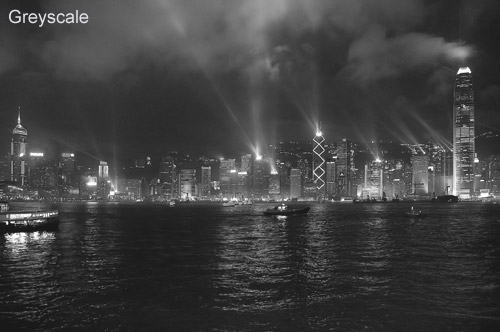
Almost all digital cameras have a series of black and white or monochrome modes within their menus that allow you an easy way to get extra creativity from your shots, when you need it.
A black and white image is a record of the brightness of your subject. That is how black and white photography works. It excels in capturing shapes, patterns, lights and moods.
Digital Infrared Photography

You can take photos without visible light with most cameras. This is known as Digital Infrared Photography
Instead of registering visible light – that is green, red and blue – the camera records images made by invisible light, which is beyond red. Without sounding too ‘techy’, light that has longer wavelengths than ordinary red light.
Going infrared requires screwing a filter onto your lens. Blues turn almost black and green becomes a ghostly white.
Digital Portrait Photography

Taking Portrait photographs is an art with few masters. A digital photography technique that you might assume is easy, because all you are doing is capturing a person’s likeness.
There are many elements that go into making a great portrait – make-up, lighting, the equipment, camera and subject.
The main question I ask myself when taking a portrait shot is ‘Why am I taking the portrait?’ Is it formal, casual, comical, etc…
Digital Macro Photography
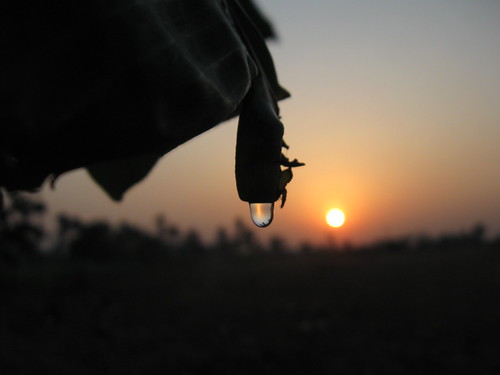
Close-up as it is more commonly known is useful if your favourite subjects are small.
If you are photographing flowers, insects or jewellery, you’ll need to get close to fill the frame.
Macro means taking pictures of subjects nearer your camera than it will normally focus.
Typically that means between a few centimetres and a metre away.
Basic Digital Photography Techniques
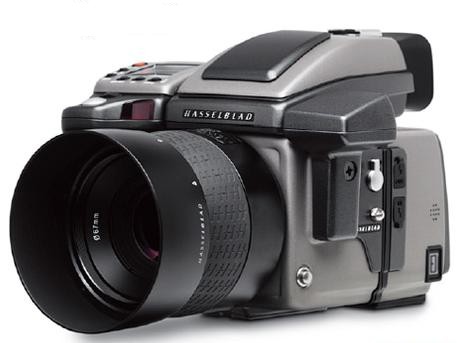
The first area we need to cover is your digital camera. Your camera is a tool! You need to know how your camera works – its functions and capabilities.
Familiarise yourself with your digital camera by trying out each of the features and read the manual as you go.
Don’t be afraid to take lots of pictures – this will help you understand the camera more.
In order to make best use of these digital photography techniques, you need to be able to have manual control over your camera's functions – this gives you a lot more creative control over the resulting image.
The types of digital photography techniques you can apply will be different depending on the type of camera you have – smaller point-and-shoot cameras typically will have fewer options - or limit you to common presets.
More advanced digital SLR's will give you greater flexibility over how the picture is taken. These ‘Prosumer’ and ‘DSLR’ models also have interchangeable lenses that allow for further creative photo options.
Before we look at some of the more advanced digital photography techniques, I want to quickly recap on some of the basic skills that will make a huge difference to your amateur photographs in minutes.
Frame Your Shot. A frame focuses attention inside the picture. Your photos can include their own frame to add drama and draw attention to the subject. Try taking a picture through an archway, through a window or even out of a cave.
Get Closer. One of the most important rules of photography is to get closer to your subject. By getting closer to the subject, there is less chance of the surroundings distracting the viewer's eye when displaying your photograph.
To acquire a good camera technique and gain an excellent digital photography education, you should sign up for an online photography class at one of the many online schools.
Tuesday, February 16, 2010
Focus: Controlling Sharpness

This is the easy part! The focus control sets the distance
at which objects will appear sharp and clear in the final
photograph. Setting the focus changes tiny distances
between elements inside the lens, altering the way light
passes through it. Focus isn't measured in stops like
other camera controls – it's just a distance, in either feet
or metres.
The focus on most newer lenses can be set using a ring
on the lens barrel. A switch on the lens or the camera
body sets the camera to "autofocus" (it finds the focus
point automatically) or to "manual focus" (you find the focus point yourself). Focusing
isn't complicated, but it can be important to do it carefully. The focusing ranges of
particular lenses vary, but most can focus from about 0.5m to infinity.
You'll be able to easily tell where your lens is focused – everything at that distance will
appear sharp and clear in your camera's viewfinder. Some modern cameras also have
"focus confirmation", a small light that flashes on in the viewfinder when correct focus is
achieved, even when manually focusing
Exposure: Aperture and Shutter Speed Combined
When you take a photograph with your camera, two important things happen: the
aperture snaps down to your chosen size, and the shutter clicks open for exactly as long
as you told it to. All in the blink of an eye! Both the aperture and shutter speed limit the
light that comes into the camera. The combination of the two is what's called an
"exposure": exposing the digital sensor (or film) to just the right amount of light to make
the photograph appear not too light and not too dark.
Most cameras have built-in "light meters" that suggest
appropriate exposures based on the brightness of the scene.
Exposures values are measured in stops (like apertures and
shutter speeds) relative to the suggested exposure. By
reading your light meter (look through the viewfinder) you
can tell if the photograph you're about to make will be too
bright (+), too dark (-), or just right. You can then make
adjustments to the aperture or shutter speed if you want to.
You can get the same exposure by using different aperture
and shutter speed combinations. If you want the same
results, you'll have to speed up or slow down the shutter
speed by the same number of stops you widen or narrow the aperture by (and vice versa).
Remember the effects that different apertures and shutter speeds will produce!
For example, all three of these aperture / shutter speed
combinations produce the same final exposure. There
are lots of other combinations too – you're only limited
by the range of your camera and lens! Try finding the
suggested exposure for a certain subject through your
camera's viewfinder. Change either the shutter speed
or the aperture, then think about how to adjust the other
to bring the exposure back to where you started.
Exposure Fact #1
Your camera's light meter will change its suggested exposure based on the ISO
setting of your digital sensor (or film). The ISO setting changes the sensor's
sensitivity to light, and is commonly set to 100, 200, 400, 800, or 1600. As usual,
each higher ISO is one stop "faster" than the last, and requires half as much light
to obtain the same exposure. For example, if your camera's light meter suggested
"1/60s at f8" for ISO 100, it might suggest "1/125s at f8", or "1/60s at f11" for
ISO 200.
Exposure Fact #2
Your camera's light meter will suggest an exposure that makes your photograph
"18% gray" – the optimum exposure to show the most detail. If you want the
photograph to look brighter or darker, you'll have to change either the shutter
speed or aperture. For example, if you were taking a photograph of a bright white
picket fence, you might have to overexpose (brighten) the photograph. You can do this either by slowing down the shutter speed or opening up the aperture,
probably by about 1 or 2 stops.
Aperture: Half of "Exposure"

The term "Aperture" actually refers to the size of the aperture (an adjustable hole that
light passes through on its way through the lens). The photographer can change the size
of the aperture with controls on the camera body, or with a ring at the base of the lens (on
older cameras).
Apertures are sometimes called "f-stops", and are usually written with a script "f" in
front. Watch out – small numbers mean big apertures, and big numbers mean small
apertures! (For instance, f2.8 is bigger than f16.) Each number in the series is considered
to be 1 "stop" different than the last, allowing 1/2 as much light into the camera.
Some lenses "stop down" to different apertures than others. Zoom lenses usually have a
lower aperture range than "prime" (non-zoom) lenses. Low magnification lenses usually
include bigger aperture settings, and high magnification lenses usually include smaller
ones.
Aperture Fact #1
The smaller you make the aperture, the less light can come through the lens. You
may have to balance a small aperture setting with a slower shutter speed to allow
the right amount of light into the camera, and vice versa. (More on this later!)
Aperture Fact #2
Regardless of where you focus the lens, more of
the photograph will appear sharp and clear if
you use a smaller aperture. To see this for
yourself, make a pin-hole in a piece of paper
and look through it. Focus your eye on
something far away and hold a finger out in
front of you. Keep your eye focused, and take
the paper away. Notice how much blurrier your
finger looks without the narrow hole! This is
why controlling the aperture size is important –
you can choose to make the whole picture sharp and clear, or to make most of it
blurry and have only your focus point stand out.
Monday, February 15, 2010
Shutter Speed: The Other Half of "Exposure"

The "Shutter Speed" is the length of time that the shutter (a tiny metal curtain) clicks
open, allowing light from the lens into the camera. The photographer can change the
shutter speed with a control on the camera body.
Shutter Speeds are given in seconds – usually in fractions of seconds. The bigger the
number, the slower the shutter speed. There are other shutter speeds too – from 1/8000s
to many hours! Each number in the series is considered to be 1 "stop" different than the
last, allowing 1/2 as much light into the camera. For example, 1/125s is two stops slower
than 1/500s.
Usually, only expensive camera bodies have shutter speeds from 1/4000s to 1/8000s.
Newer, computerized cameras will have shutter speeds from 30s to 1/2000s. Older
manual cameras range more from 1s to 1/500s. For shutter speeds longer than 30s, you'll
have to lock the shutter open and time it yourself.
Cameras will usually just show you the bottom part of the shutter speed number: for
example, 1/15s will be shown as 15. When the numbers get bigger than a second, they'll
add a quotation mark: for example, 1s will be shown as 1".
Shutter Speed Fact #1
The faster you make the shutter speed, the less light can come through the shutter.
You may have to balance a faster shutter speed with a wider aperture opening to
let the right amount of light into the camera, and vice versa. (More on this later!)
Shutter Speed Fact #2
Fast shutter speeds "freeze" action, while slow
shutter speeds show action as a blur. For
example, if you were to photograph a person
riding a bicycle with a shutter speed of 1/250s,
the rider in the photograph would appear to be
almost motionless. If you took the same
photograph with a shutter speed of 1/15s, the
rider would appear as a streak across the
photograph. 1/8000s is fast enough to freeze
the motion of an airplane prop! 2s (with the
camera steady on a tripod) is long enough to
make flowing water look smooth and silky.
Basic Photography

This is the first course in the Basic Photography Tips series. By the end of the article,you'll know how to work a camera manually, and you'll be able to tell how each of thethree basic controls affects the photograph – a great start to becoming creative with yourphotography.Note: To start with, don't be afraid of your camera! It's safe to press any button youwant. At worst, you'll screw up some pictures. At best, you'll create an amazing piece ofart that will change people's lives for generations!Most cameras seem complicated at first, but there are really only three essential controlsthat will affect the look and feel of your photographs:Aperture: A hole that light passes through on its way through the lens. The photographer controls the size of this hole.Shutter Speed: The amount of time that the sensor (or film) is exposed tolight from the lens. The photographer controls this time.Focus: The distance at which the lens makes the subject appear sharp andclear. The photographer controls this distance.Almost all the buttons and dials on your camera are designed to control just these threethings! Modern cameras have automatic controls, which can be faster and easier thandoing it all yourself. However, no camera can tell how you want the photograph to look– learning how to work everything manually will let you be more creative! For thistutorial, set your camera's picture mode to "M" (manual).
Subscribe to:
Posts (Atom)